Time Blocking, Without The Daily Planning Ritual
Time blocking is one of the most effective productivity methods in the literature — and one of the hardest to stick with. AI time blocking removes the part that breaks: the manual placement.
What it is
A planning method where every task is assigned to a specific block of time on your calendar — not just a to-do list.
Why it works
Forces realistic capacity, surfaces overcommitment, and removes the decision "what should I work on next?" from the workday.
Why it fails
The daily ritual of manually placing tasks into time slots is exhausting and the first thing to get skipped.
What AI time blocking changes
The AI handles placement based on priorities, deadlines, working hours, and existing meetings — so the method stays sustainable.
On-device AI
AI Calendar Buddy uses Apple Intelligence on-device, so the scheduling decisions never reach a third-party cloud.
Result
A realistic plan in seconds — no morning planning meeting with yourself.
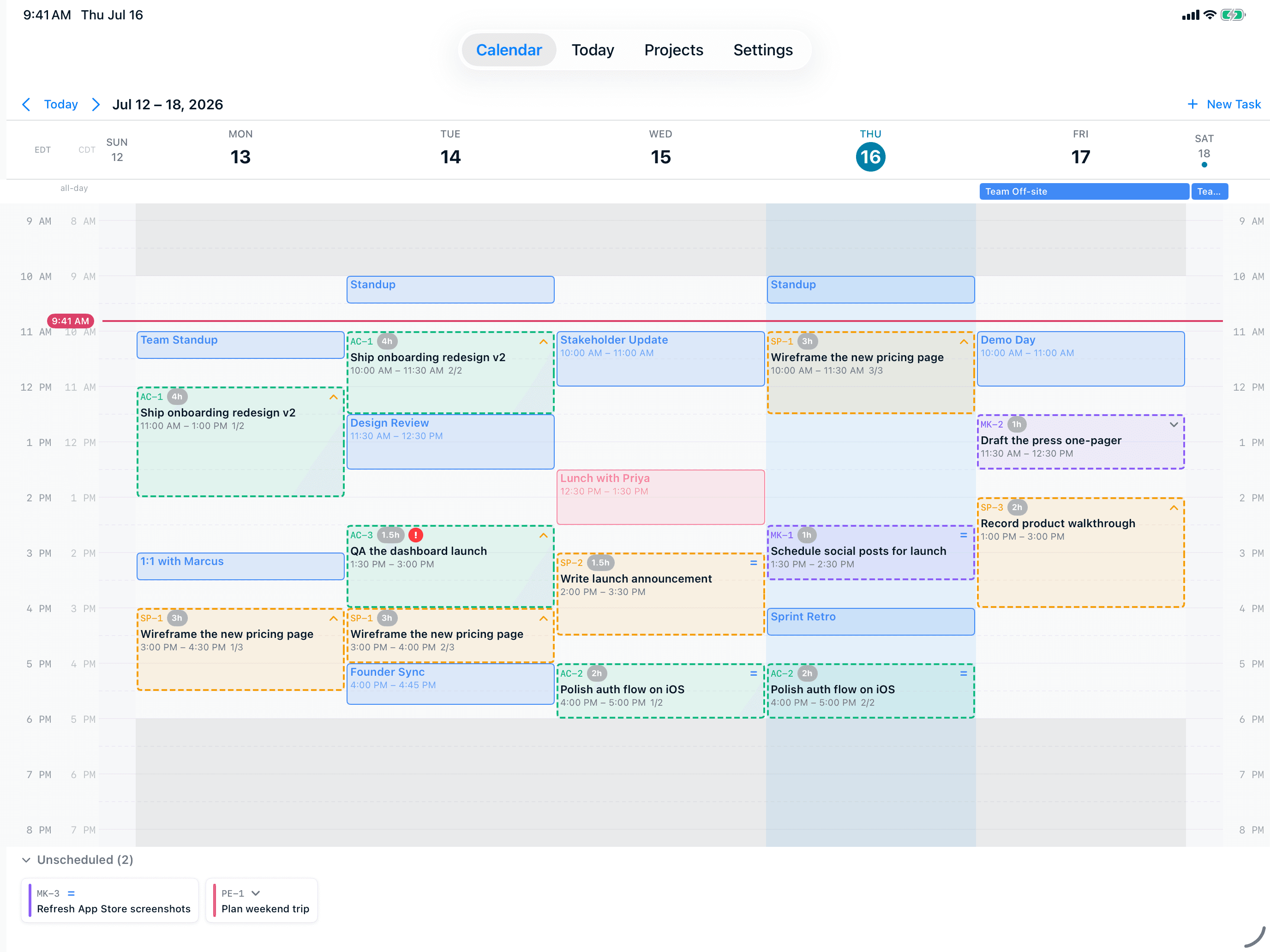
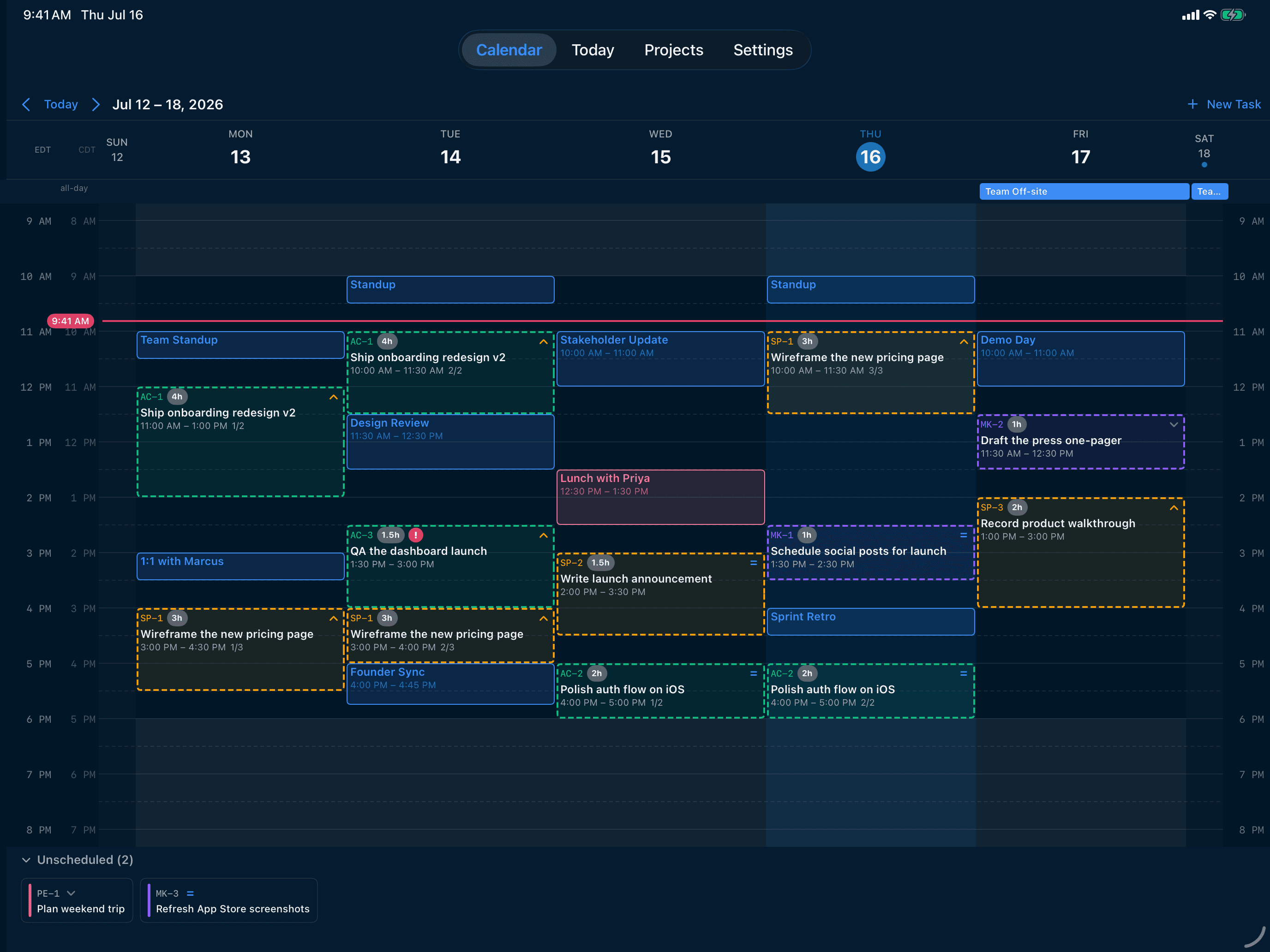
What is time blocking?
Time blocking is a planning method where every task is given a specific block of time on your calendar, alongside your meetings and appointments. Instead of working from a list of things you might do today, you work from a schedule of things you will do at specific times. The method has been popularized by Cal Newport (Deep Work) and others, and it's grounded in basic principles of attention and decision-making: every time you have to decide "what should I work on next?" you pay a small attentional tax, and that tax compounds over a day.
Why time blocking works
Three reasons time blocking outperforms open-ended to-do lists in most cases:
- It forces honesty about capacity — you can't pretend a 12-hour list will fit into an 8-hour day if every task has to claim a slot
- It surfaces overcommitment before it becomes a missed deadline — when there's no slot left, you have to renegotiate now rather than tomorrow
- It removes the "what's next?" decision from the workday — when 10am hits, you don't deliberate, you just do
Why most people fail at it
If time blocking is so effective, why doesn't everyone do it? The answer is the daily ritual. Manual time blocking typically requires 15-30 minutes every morning: open your calendar, look at your task list, decide what fits where, drag each item into the right slot, double-check against existing meetings, and start the day. For people whose attention is the bottleneck in the first place — including most ADHD brains, most knowledge workers under deadline pressure, and most parents — that ritual is exactly the part that fails to happen. And if you skip the ritual, you don't get a partially-time-blocked day. You get no time-blocked day at all, because everything bleeds back into ambient priority chaos.
What AI time blocking changes
AI time blocking automates the placement step. Instead of dragging tasks into slots, you describe what you need to do, and the AI places it into your real calendar based on priorities, deadlines, working hours, and existing events.
- You still set the priorities, deadlines, and working hours — those are decisions only you can make
- The AI handles the combinatorial "what fits where" problem — which is exactly the part humans are bad at
- Re-planning is one tap, not a 30-minute redo — when the day breaks, the AI rebuilds around what's left
- Hour-based estimates and partial completion are honored — log progress and only the remaining time gets reblocked
How AI Calendar Buddy approaches AI time blocking
AI Calendar Buddy is built around the principle that you should set the goals, but the placement should be automated. Apple Intelligence runs on-device, reads your real calendar through EventKit, and places your tasks into the optimal open slots in seconds.
- Natural-language task entry — describe what you need in plain English
- One-tap scheduling — Apple Intelligence places everything around your real meetings
- Priority and deadline awareness — critical work gets the best focus hours
- Working hours and blocked dates as hard limits — the AI cannot cross them
- Auto-rollover for unfinished tasks — no end-of-day guilt prompt
- Re-schedule any time the day breaks — fixed in seconds, not minutes
Best practices for AI time blocking
AI doesn't change the fundamentals — it just removes the friction. Most of the same tactics that make manual time blocking work also apply here:
- Estimate task durations honestly — the AI is only as good as the inputs you give it
- Set realistic working hours — including buffer time and breaks
- Use priority levels meaningfully — if everything is critical, nothing is
- Block dates for non-work commitments (school pickup, appointments, travel) so the AI can't book over them
- Re-schedule when the day breaks — don't try to rescue a plan that's already off the rails
- Trust the AI on small placement decisions — fight only the ones that actually matter to you
FAQ
Common questions
What is time blocking?+
Time blocking is a planning method where every task is assigned a specific block of time on your calendar. Instead of working from a list of possibilities, you work from a schedule of commitments. It's been shown to outperform open-ended to-do lists for most knowledge workers.
Why does manual time blocking fail for most people?+
The daily planning ritual — 15-30 minutes of dragging tasks into slots — is the part most people skip when life gets busy. And without the ritual, time blocking doesn't work at all. AI time blocking removes that failure mode by automating the placement step.
Is AI time blocking different from regular time blocking?+
Same method, different ergonomics. You still set the priorities, deadlines, and working hours. The AI handles the combinatorial placement problem — the part that's actually hard and the part humans tend to skip.
Will AI scheduling work for ADHD?+
Yes, and arguably better than for neurotypical users. The biggest failure mode for ADHD time blocking is the morning ritual; removing that removes the wall. See /for-adhd for more on the specific ADHD-friendly design choices.
What if the AI gets it wrong?+
Manual drag-and-drop always overrides AI placement. You can also re-schedule with a single tap — the AI rebuilds the plan around your manual edits.
Do I still need to estimate task durations?+
Yes — the AI is only as good as the inputs you give it. AI Calendar Buddy supports estimates from 15 minutes to 40 hours, and partial completion is honored so log progress as you go.
Is my time-blocked schedule private?+
With AI Calendar Buddy, yes. All AI runs on-device via Apple Intelligence. Your tasks, meetings, and patterns never reach a third-party AI provider or a CamSoftware server. Sync uses your private iCloud (CloudKit), encrypted by Apple.